myApria Medical Supplies
- 4.7
- Rating
- 10.00K
- Installs
- Free
- Price

 Analysis by App-foxy
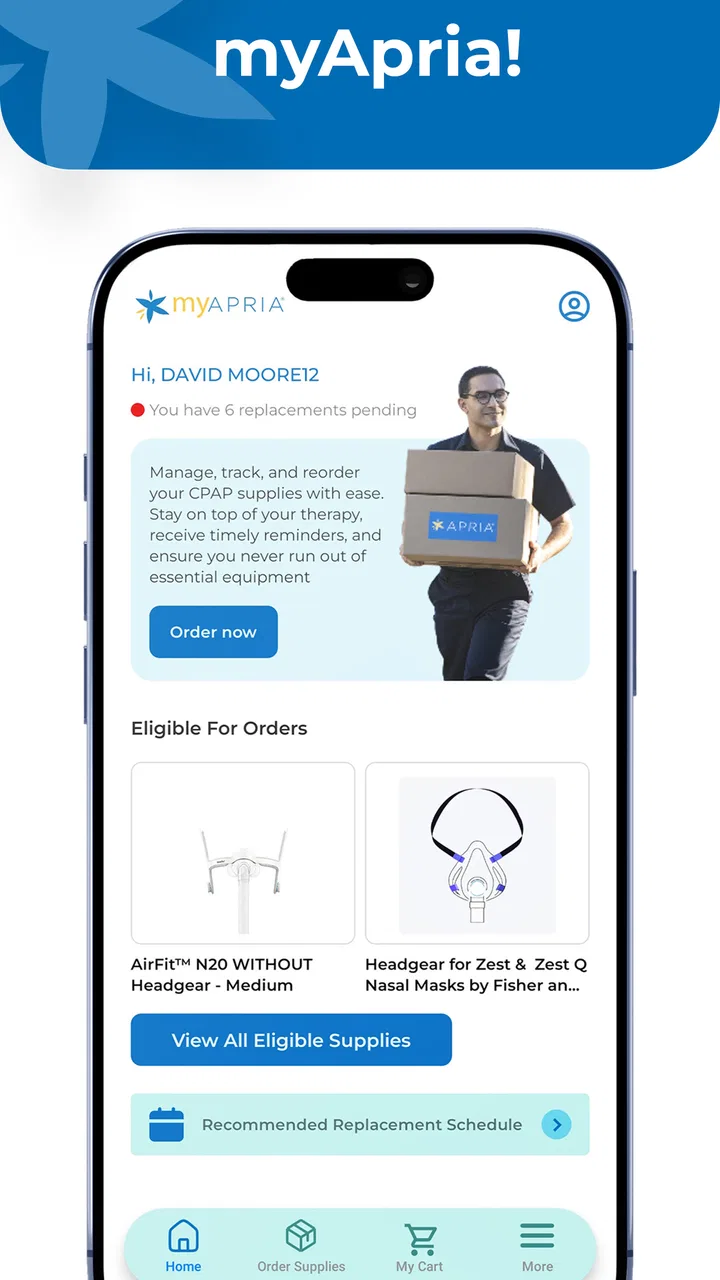
Managing medical supplies is rarely difficult because of the supplies themselves. The frustration usually comes from remembering what is needed, checking whether insurance can cover it, placing an order at the right time, and then finding the shipment when it is on the way. That is the space where myApria aims to help. It is a free medical app from Accendra Health for handling Apria information, ordering supplies through insurance, and following shipments from a phone.
I see the app as most useful in a household where one person uses the supplies but another person handles the practical details. A partner may place the order, an adult child may help a parent keep track of deliveries, or a caregiver may need a quicker way to check progress than repeatedly calling for an update. The app does not replace medical advice, but it can make the administrative side of ongoing care less scattered.
Its public reception is encouraging: it holds a 4.7 average from around 437 ratings, with more than 100 written reviews and over 10 thousand installs. Those figures suggest that the app has found a useful audience, although they should not be treated as proof that every insurance situation or household workflow will feel equally smooth. My overall impression is that myApria is a focused convenience tool rather than a complete health-management platform.
You May Also Like

 AccuWeather: Weather Radar
AccuWeather Review: A Quick, Clear Forecast for Everyday Decisions
For everyday plans, the best forecast is the one you can understand quickly. AccuWeather makes rain timing, radar, and local conditions easy to act on, with a few trade-offs.

 Hill Climb Racing
Why Hill Climb Racing Still Turns Crashes Into One More Run
A tiny car, a bumpy hill and one more upgrade: Hill Climb Racing keeps resurfacing because its simple chaos makes every near-miss feel personal.

 AliExpress - Shopping App
AliExpress Makes Global Shopping Feel Personal, but Shoppers Bear the Risk
AliExpress turns a global marketplace into a pocket-sized discovery engine. Its reach is useful, its shopping loop compelling, and its trade-offs easy to miss.

 Lords Mobile: Kingdom Wars
Lords Mobile Is a Kingdom-Building Routine, Not a Quick Match
A case-by-case verdict on the building, battles, device demands, and social commitments that make Lords Mobile rewarding for some players and exhausting for others.

 PDF Scanner app - TapScanner
TapScanner Makes Paperwork Easier to Capture, Check, and Share
TapScanner makes scanning with a phone feel less like a rescue operation and more like a dependable step in getting work done. Its capture tools are useful, though not flawless.

 Block Blast!
 Shows How Much a Puzzle Game Can Leave Out
A quiet grid game shows why puzzle players increasingly value instant clarity, repeatable skill and low-pressure play—and where the genre still needs to catch up.
More From Our News Desk
View All News


How myApria fits into a shared household routine
I’d treat a shared household routine as a way to make Apria-related tasks easier to coordinate, not as a reason for everyone to use the same account or device freely. Agreeing on who checks an order and who confirms that a delivery arrived can prevent crossed messages, especially when a caregiver helps from elsewhere. That small division of responsibility leads naturally to the next question: how to keep the routine clear when plans change.
One person uses the supplies, another person manages the task
A realistic example is a parent who relies on recurring medical supplies but does not enjoy managing online orders. An adult child can sit with them, open the app, review the relevant Apria information, and work through the ordering process together. Afterward, shipment tracking gives both people a practical reference point instead of leaving the delivery status in one person’s memory.
That shared-device scenario is where I think the app has its clearest value. It puts the task in a place that is easier to access during a phone call, at the kitchen table, or while checking whether the household still has enough supplies. The benefit is not that the app makes a medical decision. The benefit is that it reduces the number of small administrative steps surrounding a decision that has already been made.
I would still keep the person who uses the supplies involved whenever possible. Ordering is not just a shopping action; it can affect timing, insurance processing, and whether the right item is requested. A helper can operate the phone, but the patient should remain the source for details about what is actually needed. That simple boundary prevents convenience from turning into guesswork.
What the app does better than the usual alternatives
The traditional alternative is a phone call, often made while searching for account details, previous order information, or delivery notes. Calling can be the better choice when a situation is unusual or urgent, but it is less convenient for a routine check. The other common option is using a browser, which can work well on a computer but feels less immediate when someone is standing in front of an almost-empty supply cabinet.
myApria’s advantage is concentration. The app brings Apria-related information, insurance-based supply ordering, and shipment tracking into one mobile experience. That makes it more practical for a quick household check than keeping a browser tab open or relying on email searches. I especially like the idea of using it as a shared reference during a delivery conversation: one person can see the current order progress while the other confirms what the household is waiting for.
There is also a trade-off. A focused app is useful only for the service it represents. If a household receives supplies from several providers, myApria cannot become a universal organizer for all of them. In that situation, a general notes system or a broader health-management solution may be more convenient for the big picture, while this app remains useful for Apria-specific tasks.
Setting up sensible boundaries before sharing the phone
Because this is a medical app, I would not treat a shared device casually. Before using it with another person, decide who should operate the account and who should merely assist. The person helping should avoid making assumptions about the order, changing details without discussion, or treating visible account information as general household information.
This matters especially when a family uses one tablet or phone. A device can move between people quickly, and a medical account should not be opened in front of someone who does not need to see it. I would make the routine deliberate: open the app for the specific task, complete the check or order, and close it when finished. That is a small habit, but it keeps shared use more respectful.
I also recommend checking the order details aloud before submitting anything. Confirm the type of supply, the quantity shown, and the delivery expectation against what the patient actually needs. The app can make ordering easier, but it cannot know whether the household has counted its remaining stock correctly. The most useful workflow is therefore a two-person check, not blind reliance on a convenient screen.
Another practical tip is to use shipment tracking as a planning aid rather than as permission to delay preparation. If a delivery is moving, that is reassuring, but the household should still keep track of its current supply. Tracking is valuable because it tells you when to investigate a delay; it does not eliminate the need to plan ahead.
Coordinating orders without creating confusion
Shared responsibility can quickly become duplicated responsibility. If two relatives both believe the other person placed the order, the household may discover the problem too late. If both place an order independently, the result may be unnecessary confusion. I would choose one person as the lead for each order and use a simple verbal or written confirmation after the task is complete.
That is one of the less obvious ways to get more value from myApria: use the app as the place where the action happens, but use a separate household habit to clarify who is responsible. The app helps with Apria information and shipment progress; it does not need to carry every family communication duty. A short message such as “the order was checked” can be more useful than asking several people to open the app repeatedly.
For a caregiver helping from another location, the tracking function can reduce unnecessary calls, provided everyone agrees on what the status means. A shipment being in progress is not the same as the patient having the supplies in hand. I would still ask the recipient to confirm arrival, particularly when timing matters. This distinction keeps the app’s information useful without overstating what tracking can guarantee.
Insurance is another reason to slow down. The app is designed around ordering supplies through insurance, which is convenient when the request fits the expected process. However, insurance-related situations can involve eligibility, coverage, or documentation questions. When an order does not behave as expected, I would switch from repeated tapping to direct clarification through the appropriate Apria support route. The app is strongest for routine coordination, not for interpreting every exception.
Age, trust, and who should use it
The app has an Everyone content rating, so its presentation is intended for a broad audience. That does not mean every user should manage medical information without guidance. A younger household member might be perfectly capable of helping with the phone while still needing an adult to confirm the order. Age suitability and account responsibility are different questions.
For older adults, the main question is comfort rather than technical ability. Someone who already uses a smartphone may appreciate having order and shipment tasks in one place. Someone who dislikes apps may find a phone call less stressful, especially when the request is unusual. I would introduce myApria as an optional helper, not as a requirement for receiving assistance.
Trust also matters between adults. A spouse, relative, or caregiver may be authorized informally to help, but the patient should decide how much account information is shared and when. I would avoid leaving the account open on a communal device and would not hand the phone to a visitor simply because they are nearby. Medical convenience should not erase personal boundaries.
For a household with several patients, I would be particularly careful about mixing tasks. The app may be useful for Apria-related needs, but the person operating it should pause and identify whose supplies are being discussed before ordering. A shared phone makes it easy to move quickly and easy to make an avoidable mistake. Separating conversations, checking the intended recipient, and confirming the order are worthwhile safeguards.
What I would expect during everyday use
In day-to-day use, I would open myApria when I needed to review Apria information, arrange an insurance-based supply order, or check a shipment. That gives the app a clear rhythm: it is not something I would browse for entertainment or use as a general symptom tracker. Its value comes from returning to it at the right administrative moments.
The current version is 1.0.4, and the app was released on February 16, 2026. That places it early in its product life, so I would keep expectations realistic. A newer app can feel refreshingly focused, but households depending on a digital workflow should also keep a fallback habit, such as knowing how to contact the provider if the app is unavailable or an order needs personal clarification.
The minimum operating-system requirement is version 9, which makes the app accessible to many existing devices rather than limiting it to only the newest phones. Still, accessibility in practice depends on the individual device, screen comfort, and the user’s confidence with mobile forms. For a person who struggles with small text or complex navigation, a helper may make the experience much more comfortable.
Since the app is free, there is no purchase decision standing between a household and a trial. That makes it reasonable to test it during a normal, non-urgent order rather than waiting until supplies are nearly gone. A calm first attempt lets the family learn where information appears, who will take responsibility, and when a phone call would be faster.
Where the app may not be the right choice
I would not recommend relying on myApria as the only method when a patient has an immediate medical need or is close to running out of an essential item. Shipment tracking is helpful, but it is still an administrative view of delivery progress. Urgent concerns deserve the appropriate medical or provider contact, not a series of refreshes in an app.
It may also be a poor fit for someone who wants one dashboard for every prescription, appointment, provider, and supply company. myApria is narrower by design. That focus is its strength for Apria customers, but it becomes a limitation when the household’s care is spread across multiple services. A general health organizer may be better for an overall picture, while myApria can remain the specialist tool for Apria orders.
People who prefer speaking with a representative for every order may gain little from installing it. The app can reduce routine friction, but it cannot remove the need for human help when insurance details, unusual requests, or account questions require conversation. I would see it as an additional route, not a forced replacement for personal support.
Finally, it is not ideal to install it on a device that many people use without thinking about privacy. The shared-device scenario works when the household has clear trust and sensible habits. If everyone uses the same phone freely, a dedicated personal device or a more controlled workflow may be the safer choice, even if it is less convenient.
My household verdict
After looking at the app through a household lens, I think myApria makes the most sense for Apria customers who want a straightforward mobile way to manage provider information, request supplies through insurance, and follow deliveries. Its strongest use is not dramatic; it is the ordinary moment when someone needs to know what was ordered, whether the shipment is moving, or who should handle the next step.
I would recommend it to a patient who is comfortable with a smartphone, to a trusted family member helping with routine logistics, and to caregivers who need a clearer reference for Apria-related coordination. I would introduce it gradually, starting with a normal order and agreeing on account boundaries before making it part of the household routine.
My main caution is to keep its role in proportion. It supports supply administration; it is not a substitute for medical advice, emergency help, or a complete family health record. Used with that understanding, the app’s focused design is a practical advantage. It gives a shared household one more reliable place to organize a recurring task without pretending to solve every part of care.
For me, the deciding question is simple: does your household already use Apria and regularly lose time checking orders, insurance-based supply requests, or deliveries? If the answer is yes, the free app is worth trying. If your needs extend far beyond Apria, or if personal conversation is essential for every request, another option may fit better. In the right home, though, myApria is a useful coordination tool that turns a scattered supply routine into a more manageable one.
FAQs for myApria Medical Supplies
01What is myApria Medical Supplies used for?
myApria Medical Supplies is designed for Apria Healthcare patients who need to manage medical equipment and supply-related services from a mobile device. Depending on your account and location, the app may help you review equipment information, request eligible supplies, check order details, access support resources, and stay connected with Apria. Available functions can vary by insurance plan, equipment type, and patient status.
02Who can use the myApria Medical Supplies app?
The app is primarily intended for existing Apria Healthcare patients and caregivers who have an eligible account or receive qualifying medical equipment and supplies through Apria. You may need personal account information, patient identification details, or an invitation to complete registration. New users should confirm that Apria supports their equipment, insurance plan, and region before relying on the app for supply management.
03Can I order replacement medical supplies through the app?
The app may allow eligible users to review or request replacement supplies, but ordering options are not necessarily the same for every patient. Availability can depend on your prescription, insurance coverage, resupply schedule, equipment category, and Apria’s service area. Before submitting a request, carefully check quantities, delivery details, and any status information shown in the app.
04Does myApria Medical Supplies provide medical advice or emergency assistance?
No, the app should not be treated as a substitute for a doctor, nurse, respiratory therapist, or emergency service. It is mainly a tool for account, equipment, supply, and support-related tasks. If you experience a medical emergency, severe symptoms, equipment failure affecting your safety, or difficulty breathing, contact local emergency services or an appropriate healthcare professional immediately.
05What should I do if I cannot log in or my order information is incorrect?
If you cannot access your account, first verify your internet connection, login details, and that you are using the latest version of the app. Use the available password-recovery or support options rather than repeatedly entering incorrect information. For incorrect orders, missing supplies, delivery problems, or account details that need changing, contact Apria through its official support channels and keep your order information available.
Pros
- Easy access to Apria’s home medical equipment and supply services.
- Helpful for managing recurring supply orders from a mobile device.
- May simplify communication with Apria’s support and care teams.
- Useful for customers who need ongoing respiratory or medical equipment.
- Convenient access to account and service information while away from home.
Cons
- Availability and features may depend on your Apria account and service area.
- Some users may still need phone support for complex equipment requests.
- The app is mainly useful to existing Apria customers
- not general shoppers.
- Medical supply availability can vary by insurance coverage and prescription rules.
- A stable internet connection is required for most account functions.

myApria Medical Supplies
Gallery